Building your own company website is a different kind of challenge. There’s no client brief to follow. No external deadline forcing decisions. Every choice is yours — which means every choice needs to be intentional.
Here’s how we built itqanlab.com, and why we made the decisions we did.
Starting with the Name
The name came before everything else. We wanted something that:
- Means something in Arabic — we’re based in Cairo, and Arabic identity matters
- Works internationally — pronounceable and memorable for English speakers
- Reflects our values — not just what we do, but how we do it
“Itqan” (إتقان) means mastery, precision, excellence in craftsmanship. It’s a word with deep roots in Arabic culture — the idea that work should be done with the highest possible quality. “Lab” adds the experimental, technical dimension.
Together: a studio where mastery meets experimentation.
Designing the Brand
The Color System
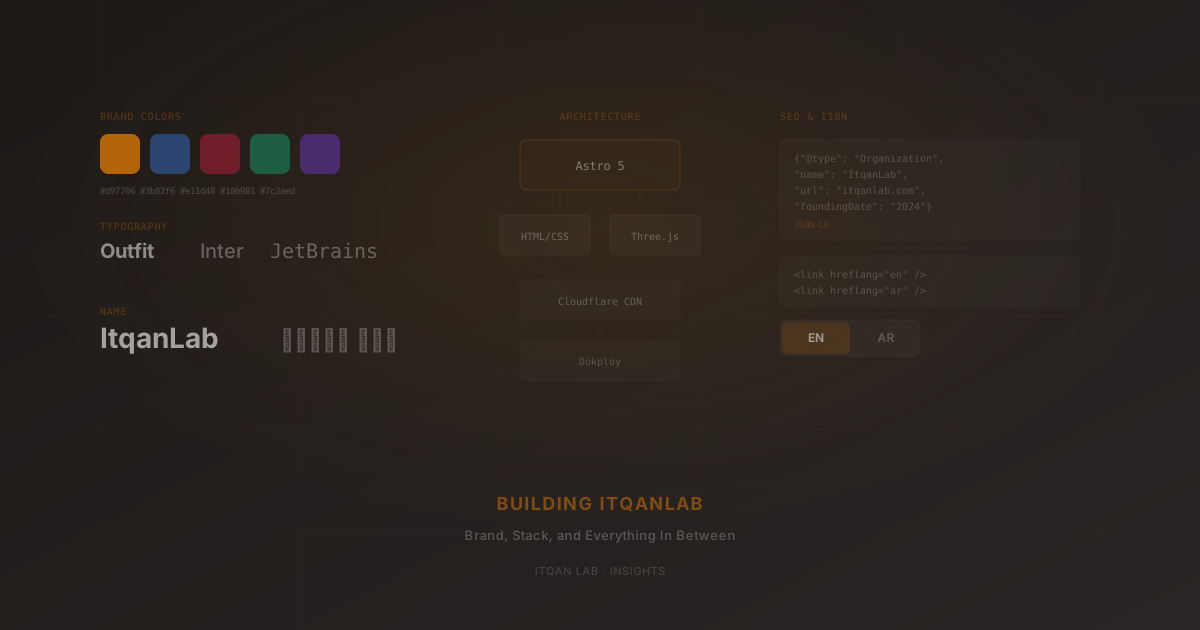
Most tech agencies default to blue. It’s safe, it signals trust, and it’s forgettable. We went with amber (#d97706) as our primary accent — warm, confident, and impossible to confuse with the competition.
But we didn’t stop at one color. We built a multi-theme system with five options:
- Amber (default) — warm, confident
- Blue — classic, technical
- Rose — bold, distinctive
- Emerald — fresh, growth-oriented
- Violet — creative, premium
Visitors can switch themes freely. It’s a small interaction that signals something important: we care about details, and we build things that go beyond the minimum.
Typography Choices
Font selection reveals how much a team thinks about design:
- Outfit for headings — geometric sans-serif with character. Modern without being cold.
- Inter for body text — the industry standard for screen readability. We didn’t try to be clever here; Inter just works.
- JetBrains Mono for code snippets — because if you’re going to show code, it should look like code.
- IBM Plex Sans Arabic for Arabic text — specifically designed for Arabic on screens. Not an afterthought Arabic font — a purpose-built one.
Four fonts sounds like a lot. But each serves a distinct role, and they never compete with each other.
Choosing the Tech Stack
Why Astro (and Not Next.js)
This is a marketing site. It needs to be fast, SEO-friendly, and easy to maintain. It doesn’t need:
- Server-side rendering
- API routes
- Complex client-side state
- A React runtime
Astro 5 gives us exactly what we need: static HTML output with zero JavaScript by default. Components are rendered at build time and shipped as plain HTML. When we need interactivity (the Three.js hero, the theme switcher), we add it surgically — only the scripts that page needs.
The result: pages that load in milliseconds, perfect Lighthouse scores, and a codebase that’s simple to reason about.
If this were a web app with authentication, real-time features, or complex client interactions, we’d choose Next.js. But for a marketing site, Astro is the right tool. We wrote about this framework of thinking in How to Choose the Right Tech Stack.
The Rest of the Stack
- HTML/CSS — no Tailwind, no CSS-in-JS. Just well-organized CSS custom properties and scoped styles. For a site this size, that’s all you need.
- Vanilla JavaScript — for the language toggle, theme switcher, and scroll animations. No framework overhead for interactions that are fundamentally simple.
- Three.js — for the homepage hero. Loaded asynchronously, doesn’t block rendering.
- GSAP — for scroll-triggered animations. Lightweight, performant, battle-tested.
Infrastructure
- Dokploy (self-hosted) — full control over our deployment pipeline
- GitHub auto-deploy — push to
main, site updates automatically - Cloudflare — CDN, DNS, and SSL. Proxy enabled with Full SSL mode
- Nixpacks — handles the build without Docker configuration overhead
Total monthly cost for hosting: essentially zero beyond the VPS we already run.
Building Bilingual Support
This was one of the more interesting engineering challenges. The site needed to support English and Arabic with:
- Instant language switching — no page reload
- Full RTL layout — not just text direction, but mirrored layouts
- Native-sounding Arabic — not translated, but written
- System language detection — detect the browser’s language on first visit
How It Works
Every translatable element gets a data-i18n attribute. A single JavaScript module (i18n.js) contains all translations in an object with en and ar keys. When the language toggles:
- All
data-i18nelements get their translated text - The
<html>element getsdir="rtl"(or back toltr) - The preference is saved to
localStorage - On first visit, the system detects the browser language
The Arabic content isn’t run through Google Translate. Every string was written to sound natural in Arabic — proper grammar, cultural context, and tone. When you read the Arabic version, it should feel like the site was built Arabic-first.
Handling RTL
CSS custom properties and logical properties (margin-inline-start vs margin-left) handle most of the RTL layout automatically. For edge cases like the hero animation and specific grid layouts, we use [dir="rtl"] selectors.
SEO from Day One
We didn’t bolt on SEO after launch. It was built into the architecture from the start:
Structured Data
Every page type has its own JSON-LD schema:
- Homepage: Organization + WebSite + FAQPage
- Blog posts: BlogPosting with author, publisher, dates
- Projects: CreativeWork with creator, industry, keywords
- Service pages: Service with provider and area served
This isn’t just for Google. Structured data helps AI systems (ChatGPT, Perplexity, Google AI Overviews) understand and cite your content correctly.
Meta & Open Graph
Every page has unique:
- Title and description (not auto-generated templates)
- Open Graph image (custom SVG converted to PNG)
- Canonical URL
- Hreflang alternates for both languages
Performance as SEO
Google’s Core Web Vitals directly impact rankings. By choosing Astro’s static output with zero default JavaScript, we start with a massive advantage:
- LCP (Largest Contentful Paint): fast, because there’s no framework hydration
- CLS (Cumulative Layout Shift): minimal, because fonts are preloaded and images have dimensions
- INP (Interaction to Next Paint): excellent, because interactions are lightweight vanilla JS
The Interactive Details
A marketing site needs personality. Templates feel like templates because they lack intentional details. Here’s what we added:
Three.js Particle Hero
The homepage hero isn’t a static image or a gradient. It’s an interactive 3D particle field that responds to cursor movement. It loads asynchronously — the page renders instantly, and the canvas initializes after.
Custom Cursor
A dot + ring cursor that grows when hovering over interactive elements. Subtle, but it makes the site feel handcrafted.
Scroll Progress
A thin progress bar at the top of the viewport. Useful on long pages, and it adds a sense of momentum.
Theme Persistence
When you pick a theme, it persists across sessions via localStorage. Return tomorrow, and it remembers your preference.
Content Architecture
Blog posts and project case studies are Markdown files managed through Astro Content Collections. Each has a TypeScript-enforced schema:
src/content/
  blog/
    building-itqanlab.md    ← you're reading this
    choosing-tech-stack.md
    ...
  projects/
    itqanlab.md
    searchcraft.md
    ...
No CMS. No database. No API. Just Markdown files in a Git repo. Adding a new post means creating a file with the right frontmatter and pushing to main.
For projects, we support bilingual content: the English body is standard Markdown, the Arabic body is HTML in a body_ar frontmatter field. Both render on the same page and toggle with the language switcher.
What We Learned
1. Build Your Own Site Like a Client Project
It’s tempting to cut corners on your own work. Don’t. Your site is the first thing potential clients see. If it feels rushed or templated, that’s what they’ll expect from working with you.
2. Bilingual is Harder Than It Looks
RTL support isn’t just direction: rtl. It’s mirrored layouts, cultural adaptation of copy, font selection that works for both scripts, and testing every component in both directions. Budget real time for it.
3. Performance is a Feature
Zero-JS defaults with surgical script loading isn’t just a technical choice — it’s a business choice. Fast sites convert better, rank higher, and feel more professional.
4. SEO is Architecture, Not Afterthought
Structured data, semantic HTML, proper meta tags — these should be in your component templates from day one, not bolted on before launch.
5. Details Compound
The custom cursor, the theme switcher, the particle hero, the scroll progress bar — individually, each is small. Together, they create the feeling that every pixel was considered. That feeling is what separates craft from commodity.
This is the kind of work we do for our clients. If you want a website built with this level of intentionality, let’s talk.
Related: See the full ItqanLab project case study and learn about our approach to Brand Identity and Web Development.